For those that don't have access to Microsoft's products, debugging in MAME by most users tends to be done with excessive printf()'s.
Therefore I thought I'd put up a quick page with links to what you need and what works for me.
- MinGW is the Minimalist GNU For Windows, a Win32 port of GCC (The GNU Compiler Collection)
- GDB is the GNU Debugger
- Insight is RedHat's GUI (Graphical User Interface) for GDB (Utitilising Tcl/Tk)
We are going to use MinGW (You should already be running this as per instructions on mame.net) and a Win32 port of Insight.
Win32 compile utilities |
| MinGW-2.0.0-3.exe |
12525 kB |
MinGW 2.0.0 compile environment for use in Windows. |
mingw-over.zip
(Visit mame.net) |
549 kB |
Other files needed to compile MAME in the MinGW compile environment. Uncompress this over the MinGW directory and add c:\mingw\bin to your PATH. Compile the Win32 version by typing make |
| gcc-3.2.2-20030208-1.tar.gz |
7148 kB |
GCC 3.2.2, required for MAME 0.66. Uncompress this over the MinGW directory. |
dx70_mgw.zip
(Visit mame.net) |
240 kB |
DirectX 7.0 headers, required for MAME 0.68. Uncompress this over the MinGW directory. |
| insight5_win32.zip |
2871 kB |
Win32 binary of Insight 5.0 (Thanks to developers of Dev-C++) |
- Install MinGW and unzip the 3 necessary updates (mingw-over.zip, gcc-3.2.2-20030208-1.tar.gz and dx70_mgw.zip)
- Unzip Insight to an empty directory (E.g C:\Program Files\Insight). NOT over your MinGW dir.
- Build MAME with SYMBOLS = 1 (-g includes debugging information)
- Run Insight by double-clicking on C:\Program Files\Insight\bin\gdb.exe
- A command-prompt should flash and disappear. Then the following interface should greet you:
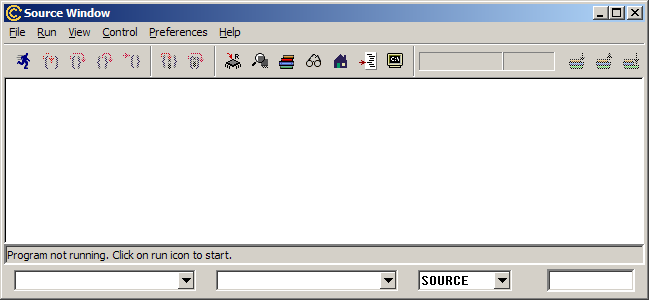
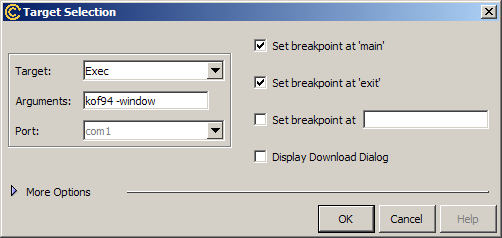
Now you are ready to debug MAME. First Click "File->Target Settings..." and set the target to "exec" and the parameters to pass to MAME:
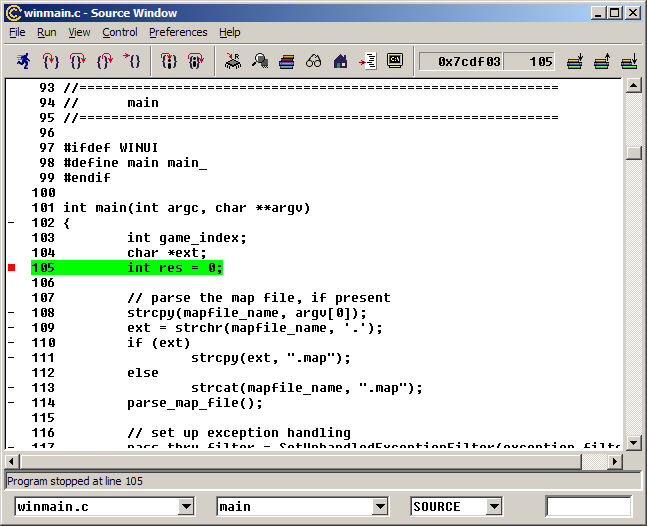
So load your MAME.exe and click "run". MAME should load and stop at the breakpoint at entry:
Now feel free to play with the debugger :)
|